
Buffer vs Loomly: Which Social Media Tool Fits An Entrepreneur Best?

The Essence of a CMS
Content Management Systems (CMS) tools have evolved dramatically over the past few years—from simple automation for posting and scheduling to sophisticated systems that help maintain content consistency across platforms. With features like tags, approval workflows, AI assistance, and cross-channel repurposing, they’ve become the backbone of modern content strategy.
As a content marketer for years, I’ve navigated from the ancient Excel sheet to Kanban boards, to what I still reminisce about—ContentCal (later acquired by Adobe, losing that startup charm I rooted for)—then to Loomly vs Buffer.
A content calendar CMS, when used right, goes far beyond scheduling. It helps entrepreneurs and solopreneurs streamline workflows, build habits of bulk creation, and recognize the importance of content pillars.
This post isn’t sponsored—like all my comparison blogs, it reflects my firsthand experience and why I’ve ended up with one tool over another.
Why CMS Matters for Entrepreneurs
Social media management is increasingly chaotic—new platforms, more content, deeper analytics, and tighter brand alignment. It’s not about how hard you work; it’s about what tools you use to keep everything organized, tagged correctly, and automatically analyzed for monthly insights.
This goes beyond content creation. It’s about workflow efficiency and brand perception—ensuring consistency that drives awareness, interest, and ultimately, consideration.
Even for someone as organized as I am, I can’t recall every post I’ve created or repurposed. Without automation, I’d spend hours manually checking analytics across platforms—and probably give up halfway.
Why I Ended Up With Buffer

I’ll be honest—the reason I switched to Buffer after Loomly was price. But after using it for a while, I found several workflow benefits.
One thing I miss from Loomly is their weekly automated email updates—motivational nudges like “You’re in the top X% of creators” or “You’ve posted five times in a row—well done!” These thoughtful touches go unnoticed in reviews but mean a lot to solopreneurs like me.

Buffer’s UX shines in small ways: being able to copy and paste an image directly into a placeholder post saves time. Clicking on a post in the calendar opens a pop-up preview instead of redirecting to a new page—clean, quick, and efficient.
However, Buffer offers only the major feature under its Team plan where Loomly truly excels: approval workflows.
How Is Loomly Different
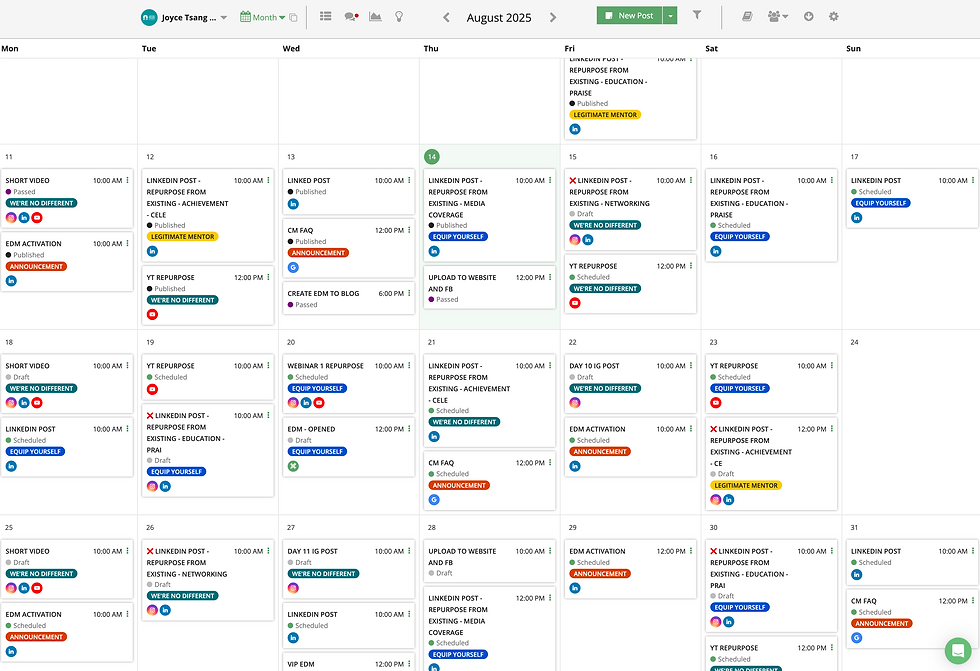
Loomly was my go-to after ContentCal—a great tool overall, especially for teams or agencies needing client feedback and approval.
I’ve used Loomly with freelance writers, where they could set placeholders, draft posts, and submit for approval. I’d get notifications, review posts, and leave feedback directly. The only minor issue: edits made in the post box don’t always reflect in previews, which can be confusing.

Still, onboarding freelancers and clients was seamless, and Loomly’s support team was responsive. You can create multiple calendars, assign access levels, and keep workflows siloed—ideal for agencies.
That flexibility comes at a cost: Buffer’s Essentials plan is USD 5/month per channel, while Loomly’s Base plan starts at USD 42/month for 10 accounts and 2 users.
If you manage multiple clients, Loomly makes sense. But for one brand across several channels, Buffer is more practical and affordable.
Feature | Buffer | Loomly |
Scheduling & Calendar | Unlimited posts per channel, drag-and-drop calendar, AI timing suggestions | Advanced calendar with AI post ideas, timing optimization, and visual previews |
Collaboration Tools | Basic team access and content approval (Team plan) | Robust approval workflows, multi-user roles, client feedback system |
Analytics & Reporting | Basic to advanced analytics depending on plan; engagement metrics and post performance | Comprehensive analytics dashboard with audience insights, engagement trends, and post performance |
Integrations | Connects with Facebook, Instagram, LinkedIn, X, TikTok, Pinterest, Google Business, and more | Integrates with all major platforms plus Slack, Canva, Unsplash, and Google Drive |
Pricing Structure | The Free plan lets you manage up to 3 channels with 1 user, offering 10 scheduled posts per channel, 100 content ideas, basic analytics, an AI Assistant, and a community inbox. The Essentials plan costs USD 5/month per channel (or USD 60/year per channel, saving two months) and unlocks unlimited scheduled posts, unlimited ideas, advanced analytics, a hashtag manager, first comment scheduling, and AI support—ideal for solo creators. Finally, the Team plan at USD 10/month per channel (USD 120/year per channel) includes all Essentials features plus unlimited team members, approval workflows, access levels, and collaboration tools, making it best suited for agencies or teams. | Starts with the Starter plan at USD 49/month (billed yearly), which includes 12 social accounts, 3 users, unlimited calendars, and core features like AI chat assistance, scheduling, approval workflows, advanced analytics, and link shorteners. The Beyond plan, at USD 249/month (billed yearly), expands to 60 social accounts with unlimited users and calendars, adding custom branding, custom roles and workflows, a hashtag manager, and calendar 2FA enforcement. Finally, the Enterprise plan offers custom pricing for 61+ accounts, unlimited users, and unlimited calendars, with all Beyond features plus priority support and tailored solutions at scale. |
Customer Support | Email and live chat support; responsive and community-driven | Dedicated onboarding reps, live chat, and priority support for higher tiers |
Best For | Solo creators, small businesses, personal brands | Agencies, teams, and multi-brand strategists |
What Worked and What Didn’t Between Loomly vs Buffer
Both tools work well—but they’re designed for different users. Buffer markets itself as “social media management for everyone,” while Loomly is clearly built for boutique agencies managing multiple clients.
Buffer: Best for solo creators or entrepreneurs needing simplicity for one brand.
Loomly: Better for agencies or strategists managing multiple brands with approval workflows.
For me, Buffer suits my current needs and budget as I grow my personal brand. Loomly would be my choice if I returned to managing multiple clients’ monthly content creation.
If you're on the same path, exploring better systems and smarter ways to grow your brand—I’d love to help.
👉 Book a free 30-minute strategy call with me to talk tools, workflows, and brand-building tactics.
📩 Subscribe to my VIP newsletter for exclusive insights on my entrepreneurial journey—including product reviews, tool hacks, and honest lessons learned.
💡 Or simply check out my Content Marketing Tools page to explore the top tools I use to manage my business as a solopreneur. You might just discover the solution you've been searching for.
Let’s make your business smarter, faster, and stronger—together!


Comments